
Healthcare IT solutions for UK providers
Healthcare software development for clinics and laboratories
Make it easier to book a visit, manage appointments and access test results. We develop patient portal software and mobile apps for UK healthcare providers, and connect the systems behind your care.
- Patient self-service
- Online payments
- HL7 & API integration
MPED PatientHub
Patient portal software.
Web and mobile access for your patients.
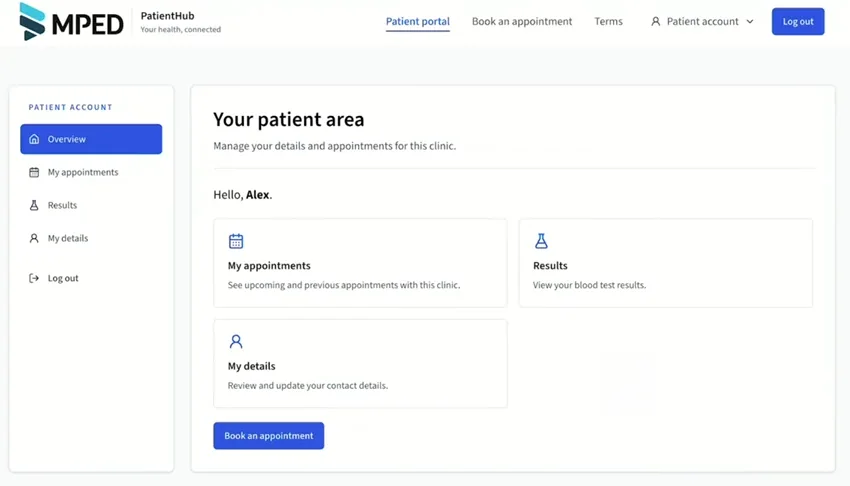
Available as a web application and a mobile app, PatientHub is tailored to your clinic’s brand and processes. Patients can book and pay for doctor appointments, keep track of visits, book for family members and access their test results.
Pawel walks through the UK patient experience, from choosing a service to downloading results. English demo with sample data.
More control over each appointment
Book and pay for doctor appointments, track visits, confirm attendance, reschedule or cancel from the patient account. Returning patients can reuse their saved details.
A clearer view of patient bookings
Appointment reminders, attendance confirmation and self-service changes support your team in managing appointments and no-shows.
Your brand. Your patient experience.
Colours, layout and portal terms can be adapted to your organisation. We define the features and connections around your workflow.
Family accounts
Book doctor appointments for yourself and family members, such as your child or your mum, from your PatientHub account.
SMS, email & push notifications
Keep patients informed with appointment reminders and updates about your clinic, including promotions. Your team can create and edit its own SMS, email and push notification templates directly in the application.
Built-in blog & content templates
Create blog posts and reusable blog templates directly in PatientHub. Your clinic’s team manages its own content, alongside the templates used for patient communications.
Patient booking system & online payments
Patient booking system.
Appointments and online payments.
Find an appointment
Choose a speciality and service, then select an available appointment. The booking flow can include a clinician and clinic location.
Check details & pay
Details are pre-filled for a signed-in patient. Review the price, accept the clinic’s privacy information and terms, then pay online through Stripe.
Track & manage appointments
Keep track of appointments in My appointments. Confirm attendance, change the appointment time or cancel, with reminders via SMS, email and push notifications.
View & download results
Open available test results from the patient account and download a copy. The demo shows a full blood count with reference ranges.
Patient results portal
Test results.
Ready to view and download.
Give patients a clear place to find their available laboratory results, alongside their appointments and personal details.
The PatientHub demo shows a full blood count with individual values, reference ranges and a downloadable result. We agree how results are transferred from your laboratory systems and made available to patients.
Watch the results walkthrough on YouTubeA connected results workflow
- 01
Laboratory system
The source of the patient’s test results.
- 02
Agreed integration
Data mapping and transfer through the available interfaces.
- 03
PatientHub account
Access to available results and a downloadable copy.
The integration is scoped for your systems and release workflow.
Healthcare systems integration
Healthcare systems integration.
Connect laboratory and clinical workflows.
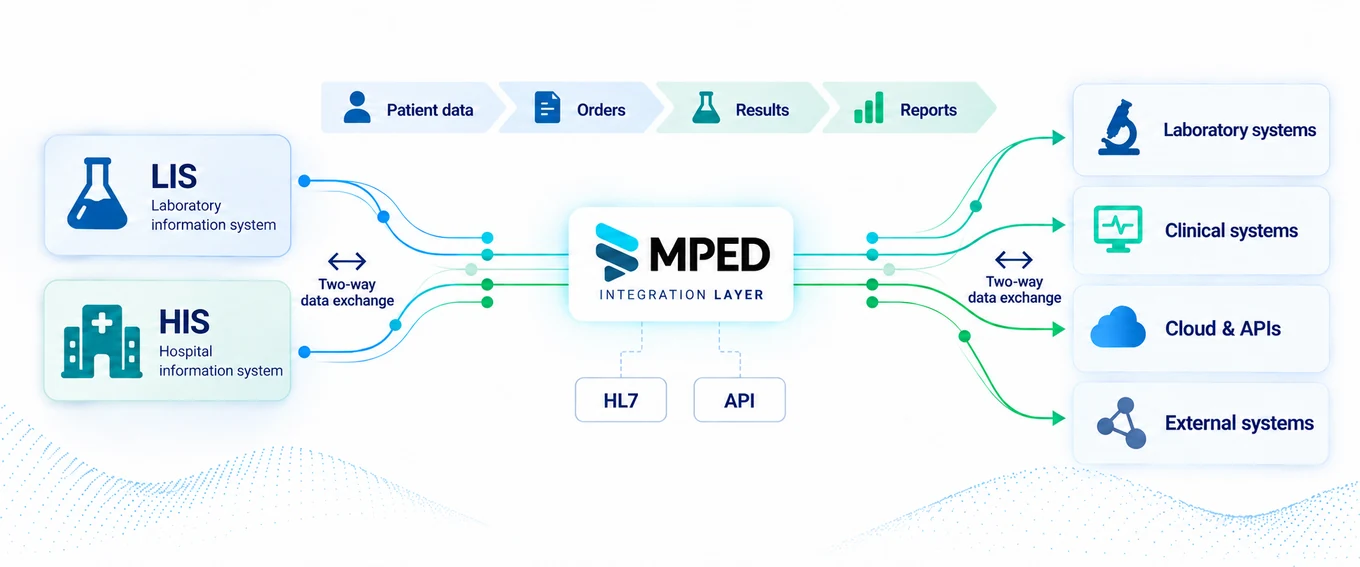
Move orders, statuses and results between the systems your teams use. We design LIS/HIS integrations using HL7 and APIs, with data mapping, validation and error handling defined for your environment.
Patient self-check-in kiosk
Bring self-service
into the clinic.
Extend the digital patient journey to reception with a self-service kiosk.
We configure patient check-in, laboratory test purchases, payments and queue workflows around your facility. This demo shows a patient purchasing laboratory tests at an MPED kiosk.
Explore the MPED self-service kioskBeyond the patient portal
Healthcare software built
around your operations.
Medical website design & online sales
Clinic websites, online stores for tests and services, and voucher or discount workflows connected to your booking and payment processes.
Website developmentPatient registration & workflow APIs
Dedicated interfaces for appointment scheduling, confirmation and cancellation, including connections to patient-service tools such as voicebots.
Clinical & business integrations
Connections between patient administration, laboratory systems, partner organisations and transport providers, scoped around the interfaces available.
From requirements to delivery
Start with the workflow.
Build around your team.
We agree the patient experience, integration boundaries and responsibilities before implementation, so your team knows what is being delivered and how it will be tested.
Map the patient and staff journey
Identify the problem, people involved, existing systems and the outcome you need.
Agree the scope and interfaces
Set out data flows, access roles, privacy requirements, error handling and acceptance criteria.
Build, test and prepare the rollout
Validate the solution against the agreed workflows and plan the handover with your team.
Questions from healthcare teams
A few things
you may want to know.
What does MPED PatientHub include?
PatientHub is available as a web application and a mobile app. It includes doctor appointment booking, online payments, appointment tracking, confirmation, rescheduling, cancellation and downloadable test results. Family accounts, SMS, email and push notifications, a built-in blog and editable content and message templates extend the experience for patients and clinic teams.
Can patients book appointments for family members?
Yes. Family accounts let patients book appointments for relatives, such as a child or a parent, from their account.
Is PatientHub available on web and mobile?
Yes. PatientHub is available as both a web application and a mobile app, giving patients access to their account, appointments and results.
Does PatientHub support SMS, email and push notifications?
Yes. PatientHub supports appointment reminders and clinic communications, including information about promotions, via SMS, email and push notifications. Your team can create and edit message templates directly in the application.
Can our clinic manage its own blog and content?
Yes. Your team can create blog posts and reusable blog templates directly in PatientHub. The clinic can also prepare its own SMS, email and push notification templates in the application.
Can the patient portal match our clinic’s brand?
Yes. We can adapt the colours, layout and branding to your clinic and configure the portal terms using the content agreed with your organisation.
Can patients view and download blood test results?
Yes. The PatientHub demo includes a full blood count with individual results, reference ranges and a download option. The available tests and the way results reach the portal depend on your laboratory systems and the agreed integration.
Can you connect our existing laboratory or clinical systems?
We assess the interfaces available in your systems, then define the data mapping and exchange workflow. Our services include LIS/HIS integration, HL7 messaging and APIs. The scope is confirmed for the specific systems and suppliers involved.
How does PatientHub help with missed appointments?
Appointment reminders via SMS, email and push notifications help patients keep track of their bookings. Patients can confirm attendance, reschedule or cancel themselves, giving the clinic a clearer view of appointments and supporting the management of no-shows.
Where do we start with a healthcare software project?
Tell us which patient or staff workflow you want to improve and which systems you use. We review the requirements and interfaces, agree a focused scope, and plan the implementation and testing with your team.
Let’s talk about your clinic
What would you like
to make easier?
Tell us about your patient journey, laboratory workflow or integration challenge. We’ll help you define the next step.